Subscribe Here RSS or Email

Showing posts with label make money online. Show all posts

1/18/08

Do you want to make money blogging?

3 comments Buzz Here
I am sure this is not new to old bloggers but if you're a new blogger though, here are some list of get paid to blog sites. This is site where you get connected with the advertisers and then take the opportunity to blog about their site in exchange of money..

Not in particular order, Here they are:

Payperpost - This is the most popular among all. You need to have at least 90 days, counted from your first posts with at least 20 pre-existing posts. Make sure that your archive shown on your blog in chronological order and not in categorical.

Sponsored Review - You set your own price here. You get paid every two weeks.

Smorty - Here are the criteria of smorty, if you have all of this you can start immediately and counting money in no time. Your Blog must indexed by Google and Yahoo, Your Blog must be Older than 3 months, must be active and have a history of two new posts per week.

Blogvertise - Once you have blog running and written content on your site your good to be accepted, unless your site is hate related, adult etc....they won't accept your blog. If your new, you might be under probation.

BloggingAds - Your blog must be in cached in Google's database. If your blog has no PageRank and a high Alexa ranking, it will probably not be approved.

Bloggerwave - Another way to earn money, If you are a new user and wish to become a blogger, simply register.

BlogtoProfit - The blog must be at least 3 months old with quality content and updated at least twice per week.

Reviewme - To be accepted into ReviewMe, a blog must meet a minimum number of citations, subscribers, and traffic. If your blog is rejected, you may want to return in a few months' time and submit your blog again.

Payu2blog - Your sign up by leaving your name, email address and Blog URL and they will contact you 2-3 days if not your blog may not meet their requirements.

This are just the few get paid to blog site. If your blogging to earn money this is your chance but if your blog is made for your business and do not want to risk the pagerank i suggest you think it twice or many times. It is known in the whole blogosphere that those bloggers that are doing paid link has been slapped by Google...the page rank's are dropped down to Zero.
10/5/07

How to optimize your site

0 comments Buzz Here
I just learned this and thought that it's really great to post it and blogging is really effective ways to share and this is tips&tricks for beginners.

One way to have your page ranking increase is to analyze your site and find ways to improve it. I am working on this matter because i want to make money online and blogging is best way to do it. I tried a lot to improve my site and i want some suggestions if you think i needed it.

Here are what needed to optimized your site and increase your page rank.
  1. This is for your Title Tag - Title is the most important element for search engine, make sure it is descriptive, attractive, containing your important keywords and well describes your web site's purpose. Make sure it is attractive, and well describes your web site's purpose. Stay away from stop words "to,From,Make" etc...consider to remove the stop word as the search engines do not count the stop word.
  2. Keywords - For optimal results it is suggested that a Keyword tag sized between 300 and 500 characters, Keyword tag should contain all the keywords you want to optimize.
  3. Description - Description Meta Tag is an important element for search engines. Again, Make sure it is attractive, and well describes your web site's purpose. The Description tag should contain all the keywords you want to optimize, If you found there is not enough keywords add these keywords to your description tag remember that keyword tag sized are between 300 - 500 characters.
One thing that i noticed with my meta tag before as well is the not in order. Make Sure that it is in order Title, Keywords, Description.

Everyday i learned and this is one of them, It is important that when you learn something make sure you apply them so that you won't forget them and make sure you share them too. I want to learn more for me to make money online from affiliate programs and blogging. I hope that with this tips that i share with you is informative enough and would help you increase you page ranking and start making money online.

8/11/07

Free tips on how to make money online

0 comments Buzz Here
How would you like to make money online with Adsense on a Website that's already making huge traffic and earned loads of money from adsense? Yes, you may now own the Google Ad units on this site, this blog and the main site. Two (2) to three (3) Google ad units with high click-throughs (CTRs) are available for you to make money.


Interested? This is not a scam guys, this is a great site that is going to help your google adsense earning skyracket because people will love the website and definitely stay on the website and even want more...

How are you going to make money? will, you only add your Adsense Publisher ID, this is not cheating aswell, this is legit and the owner is very generous share he's site for you to earn money no catch whatsoever, will actually just to bring people to he's website but it's not really hard to do...what i am doing now is bringing traffic in exchange to the website...isn't great!

Here's the three website:
Just add ?pub=X&cha=X to any of this site's page URL, like the sample URLs below:


Homepage:
http://www.freetipsandwits.com/?pub=X&cha=X

Blog:
http://www.freetipsandwits.com/moneymakingblog?pub=X&cha=X

Sub-page:
http://www.freetipsandwits.com/free-money-making-courses.php?pub=X&cha=X


Replace the X in pub with your 16-digit Adsense publisher ID and the X in cha with your 10-digit Adsense channel for tracking. Adsense ID and channel of the pages where you added those will be replaced with yours. So, clicks on the Google ads will be credited to you.

If you cannot find your Channel...Use url channel instead to track your performance:

URL channels are used track ad performance across an entire domain, across a subdomain, within directories and for individual pages. They can help you answer questions like:

  • Which of my domains is generating the most revenue?
  • On what sections of my site are ads performing best? Articles? Forums? Blog?

Creating URL Channels

URL Channels are easy to create and implement through your AdSense account. To find out how, let's take a look at an example.

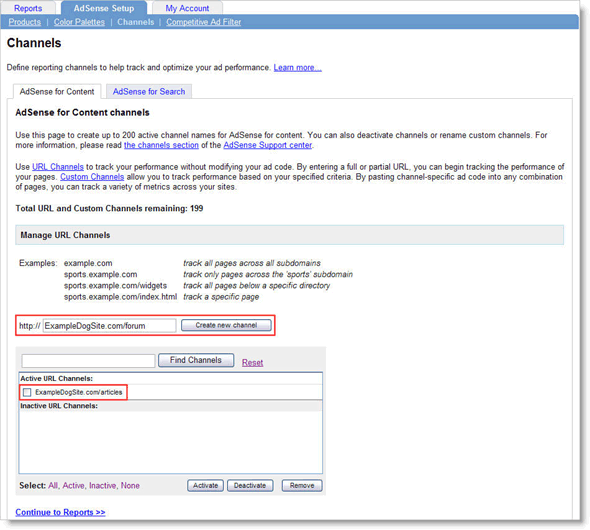
Scenario: Sally owns a site about dogs -- www.ExampleDogSite.com -- and wants to know if her AdSense ads are performing better on article pages or in forum sections.

She would do this in 2 easy steps:

  • The first step is to log in and click on the AdSense Setup tab. A row of links will appear beneath the tabs - click the Channels link.
  • Next, make sure you are on the subtab for the right product -- AdSense for content or AdSense for search -- and that you're creating a URL channel rather than a custom channel. Click the Add new URL channel link, then create a new channel for each directory by entering their addresses (omitting the 'www') into the resulting box.

In this case we'll create two channels: One for ExampleDogSite.com/articles to track the combined ad performance across all of Sally's articles, and another for ExampleDogSite.com/forum to monitor for all of Sally's forum sections.

Once created, URL channels begin collecting statistics instantly. For channels to be most useful, it's important to be able to generate an effective channel report.


Resources: Free Tips&Wits and Google Adsense

So guys, read, learn and earn.


  © Blogger template 'tbn' by thebuzznutter 2008

Bring me to TOP